How to Buy Bitcoin on Cash App: Fees, Limits and Sending to a Wallet
To buy bitcoin on Cash App, open the Money tab, tap the Bitcoin tile, choose Buy, enter an amount from $1 and confirm; you may be asked to verify your identity first. It is quick, but small one-off buys are not cheap: Cash App charges 2.0% on market buys under $500, plus a spread of up to 0.75%. Its zero-fee routes are recurring Auto Invest buys and single buys over $2,000. You can then send the bitcoin to your own wallet, free at standard speed once you hold at least 100,000 sats. Cash App pays us nothing; every figure below comes from its own fee and help pages, read on 9 October 2026.
Step by step: buying bitcoin in Cash App
Cash App's help pages describe the same short path on iPhone and Android:
- Open Cash App and tap the Money tab on the home screen.
- Tap the Bitcoin tile.
- Tap Buy, choose or type an amount (the minimum is $1) and pick your funding source.
- If prompted, verify your identity. Cash App says you may need to do this before your first bitcoin purchase.
- Check the confirmation screen, which shows the fee and any spread, then confirm.
You can pay from your Cash balance, a linked debit card or a linked bank account. One detail matters later: when you buy with money from an external bank account, Cash App restricts those funds until the bank transfer settles. You can trade straight away, but you cannot move that bitcoin off Cash App until the holding period ends.
To buy on a schedule instead, set up Auto Invest from the same Bitcoin screen and choose daily, weekly or monthly. You can also turn on Round Ups, which rounds Cash Card purchases to the next dollar and buys bitcoin with the change, or direct part of a paycheck into bitcoin. Those three routes cost nothing in fees or spread.
Fees and spread, dated
Cash App publishes a fee ladder for market buys and sells, and it falls as the order grows:
| Order size | Market buy/sell fee | Spread | Auto Invest, Round Ups, Paid in Bitcoin |
|---|---|---|---|
| $1–$499 | 2.0% | 0%–0.75% | 0% fee, 0% spread |
| $500–$999 | 1.5% | 0%–0.75% | 0% fee, 0% spread |
| $1,000–$1,999 | 0.9% | 0%–0.75% | 0% fee, 0% spread |
| $2,000 and up | 0% | 0% on buys over $2,000 | 0% fee, 0% spread |
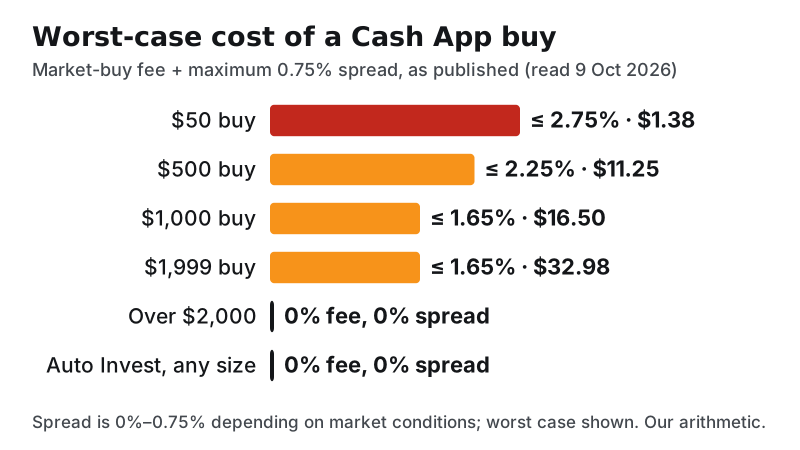
The spread is the gap between bitcoin's market price and the price Cash App quotes you. Cash App says it ranges from 0% to 0.75% depending on market conditions and is built into the price on the confirmation screen. Put the two together and the worst case looks like this: a $50 buy costs up to $1.38, or 2.75%; a $500 buy up to $11.25; a $1,000 buy up to $16.50.
The ladder creates an odd cliff. A $1,999 buy can cost up to about $33, while a buy just over $2,000 costs nothing. If you were going to buy close to that amount anyway, crossing the line saves real money. If you weren't, do not buy more bitcoin than you planned just to dodge a fee.
How does that compare? Cash App's own table lists other services at 1.0%–2.5% before their spreads, which is its framing, not ours. On an order-book exchange, small buys usually cost less: Kraken Pro's entry-tier taker fee is 0.80%, and a limit order that rests on the book is 0.40%. Kraken's simple app charges 1% plus a spread. For a regular small buyer, Cash App's free Auto Invest beats all of them on fees, which is the most useful thing to know about it.
Limits and identity verification
Cash App does not publish fixed bitcoin buy limits on the pages we could read. Instead it shows your own limits in the app: tap the Profile icon, then Limits. Limits roll over any 1-day, 7-day and 30-day period, and they reset at the top of the next hour.
There is one published number for incoming bitcoin: you can deposit up to $10,000 worth of bitcoin into Cash App in any 7-day period. Bitcoin withdrawals and deposits must be enabled in the app before you can use them.
Sending bitcoin to your own wallet
Cash App holds your bitcoin for you. Its bitcoin page says it keeps customer bitcoin 1:1 in reserve, does not lend it out, and keeps the large majority in offline cold storage. That is still custody by a company, and bitcoin on Cash App is not FDIC-insured. If you plan to hold for a long time, moving it to a wallet you control removes that dependency.
To withdraw on-chain:
- Copy a receive address from your own wallet, and check its first and last few characters.
- In Cash App, tap the Money tab, the Bitcoin tile, then the arrows button, and choose Send Bitcoin.
- Enter the amount and paste the address, then tap Next.
- Pick a speed and confirm.
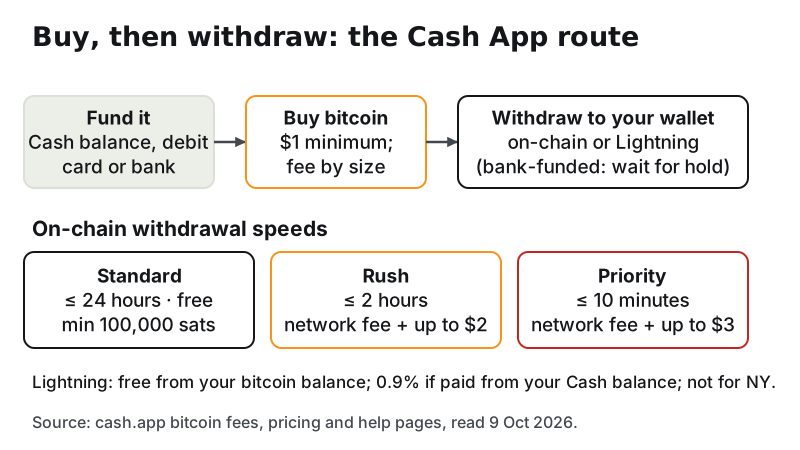
The speed choice sets the fee. Standard completes within 24 hours and is free, but needs a minimum of 100,000 sats, which is 0.001 BTC. Rush, within two hours, costs an estimated network fee plus up to $2. Priority, within ten minutes, costs the network fee plus up to $3. If your balance is below 100,000 sats, you either pay for a faster speed or wait until you hold more.
Lightning is the other option. Sending over Lightning from your bitcoin balance carries no Cash App fee; paying a Lightning invoice from your Cash balance adds a 0.9% processing fee, because Cash App converts dollars to bitcoin first. Lightning is not available to New York customers, and your receiving wallet must support it.
Send a small test amount first, every time you use a new address. Bitcoin sent to a wrong address cannot be recalled. Cash App supports only bitcoin (BTC): sending BCH, BSV or any other coin to a Cash App bitcoin address loses the funds. Your Cash App deposit address also changes after each successful deposit, so copy a fresh one each time.
Since 20 December 2024, Cash App no longer sends bitcoin between $cashtags. To pay another Cash App user in bitcoin, use a bitcoin address or a Lightning invoice.
A cheaper route for regular buyers: Kraken Pro
If you buy irregular amounts under $2,000 and want lower fees without Auto Invest, an order-book exchange is usually cheaper. At its entry tier on 9 October 2026, a Kraken Pro limit order cost 0.40% and a market order 0.80%, with lower rates as volume grows. ACH funding is free, though Kraken blocks crypto withdrawals for a week after an ACH deposit. Card deposits cost $0.25 plus 3.75%, so avoid them for routine buying. It is not open to residents of New York or Maine.
Affiliate link. We may earn a commission — it never moves a ranking.
Storing it offline: Ledger or another hardware wallet
If you are building a position over months, plan where it ends up. A hardware wallet holds your keys away from the internet, and Cash App's standard withdrawal can send straight to it. Batch your withdrawals so each one clears the 100,000-sat minimum, and keep your recovery phrase on paper, never in a photo or a cloud note. Our guide to storing your bitcoin safely covers the setup.
Affiliate link. We may earn a commission — it never moves a ranking.
Selling and cashing out
To sell, open the Money tab, tap Bitcoin, then Sell and follow the prompts. Market sells use the same fee ladder as buys: 2.0% under $500, falling to 0% at $2,000 and above, plus a spread of up to 0.75%. The dollars land in your Cash balance, from where you can move them to your bank.
For taxes, Cash App says it provides a Form 1099-B when you sell bitcoin, and that working out the tax is your responsibility. The IRS treats bitcoin as property, so each sale is reported on Form 8949, whether or not a form arrives. For other ways to cash out, see our guide to selling bitcoin. None of this is tax advice.
Cash App scams to watch for
Cash App is popular, so scammers copy it. The patterns repeat:
- Fake support. Someone claiming to be Cash App support calls, texts or messages you, then asks for your sign-in code, PIN or a "verification" payment. Get help only from inside the app.
- Cash flip scams. A stranger promises to multiply your money if you send some first. Cash App's own scam guide warns about this pattern; the money never comes back.
- Pay-to-fix requests. A caller says your account, bank or a relative is in trouble and tells you to buy bitcoin and send it to an address. The FTC's rule of thumb is blunt: only scammers demand payment in cryptocurrency.
- Guaranteed returns. An "investment" contact promises bitcoin profits. The FTC also says only scammers guarantee big returns.
The FBI's 2025 crime report counted 17,355 complaints and $1.226 billion in losses from fake tech-support and customer-service schemes that involved crypto. Those figures are not specific to Cash App, but the playbook is the same. If you have been targeted, report it at ReportFraud.ftc.gov and to Cash App through the app. Our common bitcoin scams guide covers more patterns.
Edge cases and what can go wrong
- You live in New York. Cash App's parent, Block, is licensed for virtual-currency business in New York, but Lightning is not available to New York customers.
- You bought with a bank transfer. You cannot withdraw that bitcoin until the transfer settles.
- Your balance is under 100,000 sats. Free standard withdrawal is not available; Rush or Priority adds a network fee plus up to $2 or $3.
- You pay a Lightning invoice from your Cash balance. That costs 0.9%; paying from your bitcoin balance does not.
- You sent the wrong coin. Cash App supports only BTC. Other coins sent to your bitcoin address are lost.
- Someone asks you to receive and forward bitcoin. That is a classic money-mule setup. Decline.
Cash App bitcoin: quick answers
How do I buy bitcoin on Cash App?
How much does Cash App charge to buy bitcoin?
How do I find my Cash App bitcoin wallet address?
Can I send bitcoin from Cash App to an external wallet?
Is buying bitcoin on Cash App safe?
New here? Start with the full step-by-step guide to buying bitcoin safely, or learn how to sell bitcoin and cash out.